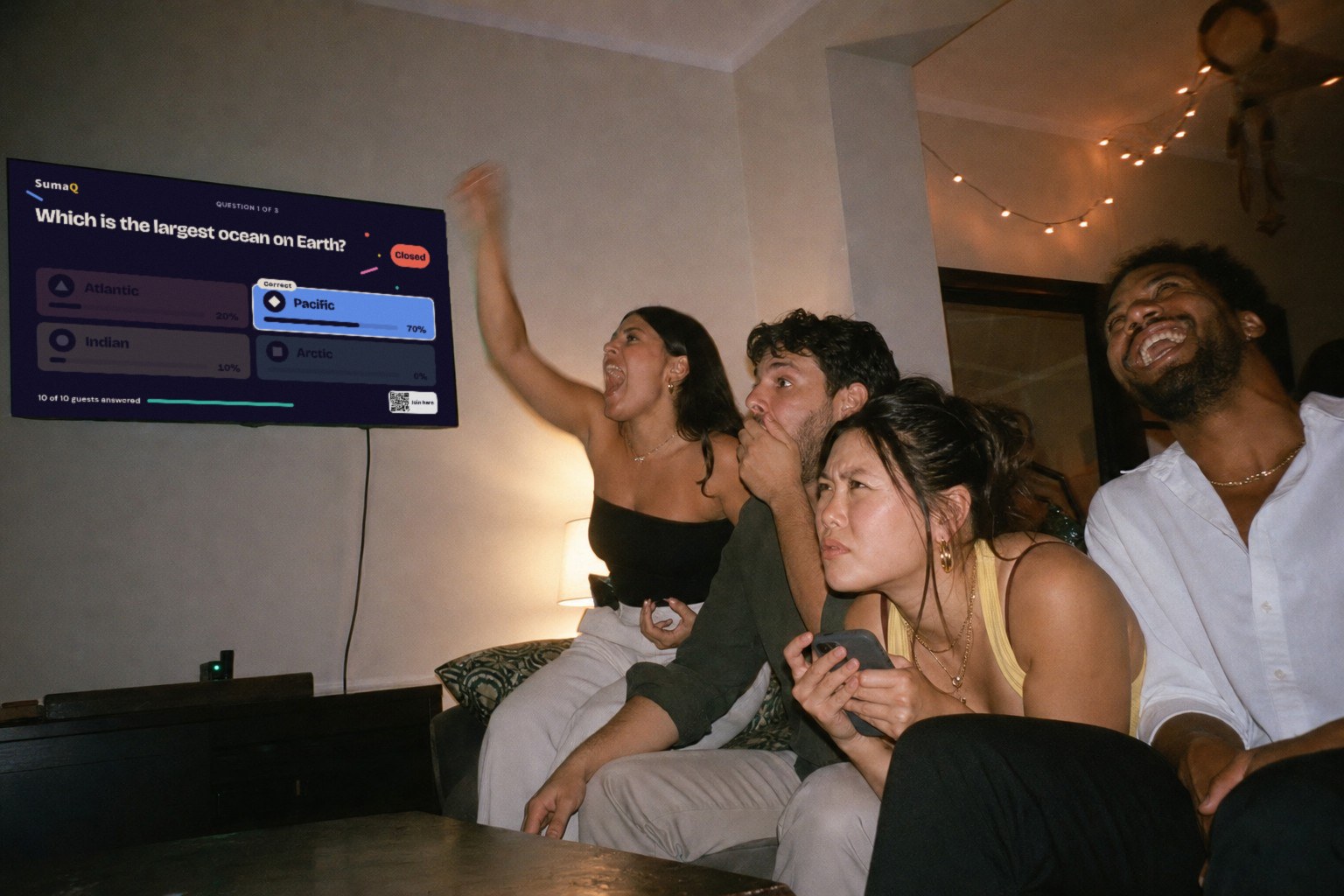
Friends on a sofa reacting to a quiz on the TV at a house party

Turn your party
into a quiz show

Questions on the big screen. Everyone answers from their own phone. Birthdays, farewell parties, office parties and wedding after-parties.

Free to startPaid plans from $15.99, one-timeNo app to installPhoto questions on Pro

Play a quick game.

Three questions. On the left is the big screen everyone watches. On the right is your phone. The demo plays on its own. Tap an answer to join in.

Big screenDemo
Your phone
How it works

Ready in three steps

Set it up the night before, or ten minutes before the guests arrive.

Question 1
Which is the largest ocean on Earth?
Choices and the correct answer
AAtlanticCorrect
BPacificCorrect
CIndianCorrect
DArcticCorrect
Time limit20 s ▾
+ Add a question
1

Write your questions

Write each question, add two to four answer choices, mark the right one and set a time limit.

2

Put it on the big screen

Open the big screen page on a laptop connected to a TV or projector. It shows the QR code, each question and the Leaderboard, and moves ahead each time you tap Next on your phone.

3

Everyone answers on their phone

Guests scan the QR code, type a name and they're in. No app, no sign-up. Two to four big answer buttons. The guest with the most correct answers wins. Ties go to the guest with less total time on correct answers.

On the night

One game.
Three screens in sync.

You run the whole show from your phone with one big button. The big screen and every guest's phone follow along.

The TVEveryone watches · Answers open
The hostOne tap moves the game on
Every guestAnswers on their own phone

Want to play along? Hand hosting over to a friend. Nothing to learn: the next step is always the one big button.

On the big screen

Nine screens.
One tap each.

What the room sees, in order. Every screen changes when the host taps the button on their phone. Pick a screen to preview, or let it play on its own.

Features

Built for the host.
Easy for every guest.

01

No app, no sign-up

Guests play in their phone's browser. Scan the QR code, type a name, tap an answer. That's all it takes, even for guests who rarely use apps.

02

Host from your phone

One big button opens each question, closes answers, reveals the answer and shows the Leaderboard. Live answer counts show how many guests have answered.

03

Build it with a friend

Invite friends to help edit the questions, run a practice and host the game with you. Whoever hosts doesn't have to be the one who made it.

04

TeamsBasic and Pro

Split the room into 2 to 15 teams: tables, departments, families. Team and individual Leaderboards show side by side, and the winning team is announced before the winning guest.

05

Photos and slidesPro

Add photos to questions and answer choices. Drop in slides for prizes or house rules between questions. Themes change fonts and colors to match the occasion.

06

Results and CSV

Every guest sees their own rank on their phone. After the game, see each guest's answers, what they got right and how fast they answered, and download it all as a CSV file.

On the night

Three things
that just work

Built for hosts who'd rather not think about the tech while holding a microphone.

1

Practice it first

Run the whole game before the party. Sample guests join automatically, so you can go all the way to the Leaderboard alone. Hide the questions in the host controls so a friend can run a practice without spoilers.

2

Reload and carry on

If a phone or the laptop reloads mid-game, everything picks up right where it left off. Progress and scores are saved on the server, not on the device.

3

Undo the last step

Tapped too early? One button steps back to the previous screen, so the pace of the room sets the pace of the game.

Ranking

Three ways to rank

Choose one for each game in the settings. All three are available on every plan.

1

Correct answers + speedDefault

The guest with the most correct answers wins. Tied? The guest who spent less time on the questions they got right ranks higher.

  1. 1Maya3 correct · 4.1s
  2. 2Sam3 correct · 5.6s
  3. 3Priya2 correct · 2.9s
2

Correct answers only

The guest with the most correct answers wins, and guests with the same number correct share a rank. No pressure to answer fast.

  1. 1Maya3 correct
  2. 1Sam3 correct
  3. 3Priya2 correct
3

Points per question

Give each question 1 to 100 points. Make the last one count double. Highest total wins; ties follow the rule you picked above.

  1. 1Maya80 pts · 3 correct
  2. 2Priya60 pts · 2 correct
  3. 3Sam40 pts · 2 correct
What you need

No special gear

In the room

A laptop connected to the TV

Any computer connected to a TV or projector, with the big screen page open in a browser.

For the host

One phone

The host runs the game from their own phone. No app, nothing to install.

For the guests

Their phones and the internet

Venue Wi-Fi or mobile data is all it takes. Guests scan the QR code and play in the browser.

Where it's played

Any room
with a screen

Coworkers at an office party holding their phones and reacting to a quiz
Pricing

Pay once per game.
No subscription required.

Start free and upgrade when you know your headcount. Prices are in US dollars, or in Japanese yen (tax included) if you live in Japan. Paid plans are sold only in the countries listed at checkout. You're charged once per game, and one-time plans don't renew. Want to keep a game going? An optional monthly plan is available.

Free
$0
Up to 10 guests
  • QuestionsUp to 5
  • Active for14 days
  • Free games per account1
  • Teams—
  • Themes, fonts & colorsParty theme
  • Slides—
  • Photos in questions—
Start free
BasicMost parties
$15.99one-time
Up to 50 guests
  • QuestionsUp to 10
  • Active for30 days
  • TeamsIncluded
  • Themes, fonts & colorsParty theme
  • Slides—
  • Photos in questions—
Choose Basic
Pro
$22.99one-time
Up to 300 guests
  • QuestionsUp to 50
  • Active for30 days
  • TeamsIncluded
  • Themes, fonts & colorsAll 11 themes
  • SlidesIncluded
  • Photos in questionsIncluded
Choose Pro
Priced per gamePractice and play as many times as you like while your game is active. Need more time? Add extra months, paid once (no auto-renewal), or switch to the optional monthly plan: $9.98 for the first 2 months, then $4.99/month, cancel anytime.
Using it for 3+ months?If you'll use it for 3+ months after buying, or reuse it for another event within 6 months, it's cheaper to choose the monthly plan ($4.99/month) under “Extra time” when you buy.
More than 300 guests?Write to info@sumaqu.app and we'll work something out.
Where paid plans are soldPaid plans are sold in the countries listed at checkout (for example the US, Canada, Australia, New Zealand, Singapore and India). The Free plan works everywhere.
FAQ

Questions hosts ask

Something else? Write to us and a real person will answer.

Do guests need to download an app?

No. Guests scan the QR code on the big screen, type a name and play in their phone's browser. No app, no account.

How many people can play?

Up to 10 guests on Free, 50 on Basic and 300 on Pro. Planning something bigger? Get in touch.

Can guests join after the game has started?

Yes. A small QR code stays in the corner of the big screen while the questions are up, so latecomers can scan it and jump in at any point.

How is the winner decided?

Choose one of three ranking methods for each game. By default, the guest with the most correct answers wins, and ties go to the guest who spent less time on the questions they got right. You can also rank by correct answers alone, or give each question its own points (1 to 100) and rank by total.

Can we play in teams?

Yes, on Basic and Pro. Add 2 to 15 team names, such as tables, departments or families, and guests pick a team when they join. Rank teams by average correct answers per guest or by total correct answers. Individual rankings are shown at the same time.

What do I need on event day?

A laptop connected to a TV or projector for the big screen, your phone to run the game, and an internet connection for your guests' phones, either venue Wi-Fi or mobile data.

What if the internet drops?

Progress and scores are saved, so reloading the page picks up right where you left off. If you're unsure about the venue's connection, test it with a practice run there beforehand.

Can I change the theme, fonts and colors?

Yes, on Pro. Pick from 11 themes and change the fonts and colors. Free and Basic use the Party theme.

Can I add photos?

Yes, on Pro. Add a photo to any question to show it on the big screen, or use photos as answer choices. Photo answer choices also appear on guests' phones.

Can I add slides between questions?

Yes, on Pro. Add slides for prizes, rules or announcements anywhere in the running order. Choose from four layouts: title only, heading and text, photo and text, or a single custom image.

Will it work for guests who aren't tech-savvy?

Guests only need to do three things: scan the QR code, type a name and tap an answer. There's no app to install and no login, so it's easy to explain to anyone with a phone.

Can I run more than one game?

Yes. Make a separate game for each event, such as a dinner and an after-party. Each game is priced on its own, and the Free plan includes one game.

How do I pay?

By card, once per game. Pick a plan when you're ready to host. You pay in US dollars, or in Japanese yen (tax included) if you live in Japan. There are no monthly charges unless you choose the optional monthly plan. Paid plans are sold in the countries listed at checkout (US, Canada, Australia, New Zealand, Singapore, India and more).

Do I have to subscribe?

Not unless you choose it. Basic and Pro are each a one-time card payment for one game and don't renew automatically. If you want to keep using the same game, you can add extra months (paid once), or switch to the optional monthly plan ($9.98 for the first 2 months, then $4.99/month until you cancel). If you'll use it for 3+ months after buying, or reuse it for another event within 6 months, it's cheaper to choose the monthly plan under “Extra time” when you buy.

Is SumaQ just for weddings?

Not at all. Hosts use it for birthdays, holiday parties, office events, farewells and weddings. It works anywhere people gather around a screen.

Ready for quiz night?

Make a game for free, do a practice run, and pick a plan once you know your headcount.

Start freeSee pricing